For businesses, file sharing security isn't optional – it's a critical component of risk management, compliance, and reputation protection. This comprehensive guide outlines best practices for secure file sharing in business environments.
The Business Case for Secure File Sharing
Data breaches cost businesses an average of $4.45 million. Beyond financial impact:
- Reputation damage – 65% of consumers lose trust after a breach
- Regulatory fines – GDPR penalties can reach €20 million or 4% of annual revenue
- Operational disruption – Average recovery time exceeds 280 days
- Legal liability – Increasing personal liability for executives
Secure file sharing isn't just IT's responsibility – it's a business imperative.
Building a Secure File Sharing Foundation
1. Choose Services with Strong Encryption
Not all cloud storage is equally secure. Prioritize services offering:
- End-to-end encryption – Files encrypted before leaving devices (end-to-end encryption)
- Zero-knowledge architecture – Provider cannot access your data
- TLS 1.3 – Modern transport encryption
- SOC 2 Type II certification – Independent security audit
GetShared provides all these security features on free and paid plans, unlike competitors that reserve encryption for enterprise tiers (see Dropbox comparison).
2. Implement Access Controls
The principle of least privilege should guide file sharing:
- Users should access only files necessary for their role
- Temporary access should expire automatically
- External sharing should require approval workflows
- Sensitive files should require additional authentication
GetShared's team collaboration features provide granular permission controls for implementing these policies.
3. Require Strong Authentication
Passwords alone are insufficient. Implement:
- Two-factor authentication – Required for all users (two-factor authentication)
- Single sign-on (SSO) – Centralized identity management
- Hardware security keys – Strongest authentication for sensitive roles
- Session management – Automatic logout, device tracking
4. Use Password-Protected Sharing
When sharing externally, always add password-protected sharing:
- Separate password delivery from link delivery
- Use unique passwords for different recipients
- Rotate passwords periodically for long-term shares
- Log all password-protected share activities
Policy Framework for Secure Sharing
Classification System
Establish data classification to guide sharing rules:
| Classification | Description | Sharing Rules |
|---|---|---|
| Public | Marketing materials, public info | Unrestricted sharing |
| Internal | General business documents | Approved platforms only |
| Confidential | Financial, HR, strategic | Password + expiration required |
| Restricted | PII, trade secrets, legal | Approval + encryption + tracking |
Acceptable Use Policy
Document clear guidelines for employees:
- Approved platforms for file sharing
- Prohibited methods (personal email, consumer apps)
- External sharing procedures
- Incident reporting requirements
- Consequences for policy violations
External Sharing Procedures
Before sharing externally, employees should:
- Verify recipient identity and need-to-know
- Apply appropriate classification controls
- Use approved platforms (e.g., GetShared)
- Enable download tracking
- Set appropriate link expiration
- Document the share in your audit log
Technical Controls
Data Loss Prevention (DLP)
Implement DLP solutions that:
- Scan files for sensitive content (SSN, credit cards, etc.)
- Block or warn on policy violations
- Monitor sharing patterns for anomalies
- Generate compliance reports
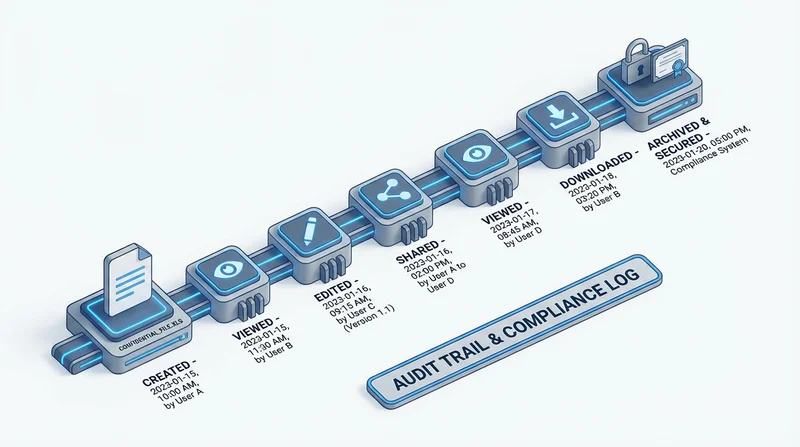
Audit Logging
Maintain comprehensive logs of:
- All file uploads and downloads
- Share link creation and access
- Permission changes
- Authentication events
- Policy violations
GetShared's enterprise features include detailed audit logs for compliance reporting.
Mobile Device Management
With mobile file sharing being common, ensure:
- Approved apps only on managed devices
- Remote wipe capability
- Encryption requirements
- App-level access controls
Compliance Considerations
GDPR
European data protection requirements (see GDPR compliance):
- Encryption is specifically recommended (Article 32)
- Data processing agreements with vendors
- Right to erasure affects file retention
- Cross-border transfers require safeguards
HIPAA
Healthcare data requirements (see HIPAA compliance):
- Business Associate Agreements (BAA) required
- Encryption required for electronic PHI
- Access controls and audit trails mandatory
- Breach notification procedures
SOX, PCI-DSS, and Industry Standards
Various industries have specific requirements:
- Financial services – SOX, FINRA retention rules
- Payment processing – PCI-DSS encryption requirements
- Government contractors – FedRAMP, CMMC
Training and Awareness
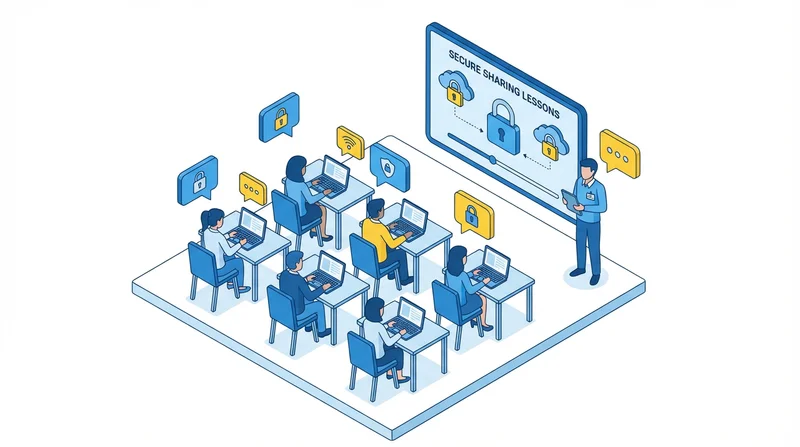
Security tools are only effective if employees use them correctly:
Initial Training
- Onboarding security overview
- Platform-specific training (how to use GetShared securely)
- Classification system explanation
- Reporting procedures
Ongoing Awareness
- Regular security reminders
- Phishing simulation exercises
- Policy updates and communications
- Incident learnings (anonymized)
Role-Specific Training
- Executives: High-value target awareness
- IT: Technical controls and incident response
- HR: PII handling requirements
- Legal: Privilege and discovery considerations
Incident Response
Preparation
Before incidents occur:
- Document response procedures
- Identify response team members
- Establish communication channels
- Test procedures regularly
Detection and Analysis
When potential incidents are identified:
- Assess scope and severity
- Preserve evidence (logs, screenshots)
- Identify affected data and individuals
- Escalate appropriately
Containment
Limit damage by:
- Revoking compromised share links
- Changing affected passwords
- Disabling compromised accounts
- Blocking malicious access
Recovery and Learning
- Restore from secure backups if needed
- Conduct root cause analysis
- Update controls to prevent recurrence
- Document lessons learned
Vendor Assessment
When evaluating file sharing services, assess:
Security Certifications
- SOC 2 Type II
- ISO 27001
- Industry-specific (HIPAA, FedRAMP)
Technical Architecture
- Encryption implementation
- Data center security
- Redundancy and backup
- Incident response capabilities
Contract Terms
- Data processing agreement
- Liability provisions
- Breach notification commitments
- Data portability and deletion
Implementation Roadmap
Phase 1: Foundation
- Select secure file sharing platform
- Deploy with basic security features
- Enable two-factor authentication for all users
- Basic user training
Phase 2: Policy
- Develop classification system
- Create acceptable use policy
- Document sharing procedures
- Communicate policies to employees
Phase 3: Advanced Controls
- Implement DLP integration
- Configure audit logging
- Establish monitoring procedures
- Role-specific training
Phase 4: Optimization
- Review and tune policies
- Conduct security assessments
- Test incident response
- Continuous improvement
Conclusion
Secure file sharing requires a combination of technology, policy, and people. GetShared provides the technical foundation with end-to-end encryption, password-protected sharing, and comprehensive team collaboration features. Built on this foundation, organizations can implement policies and training that protect sensitive data while enabling productive collaboration.
Ready to secure your business file sharing? sign up for GetShared for your team and implement best practices from day one.
Security Best Practices Checklist
- ☐ Deploy platform with end-to-end encryption
- ☐ Require 2FA for all users
- ☐ Create data classification system
- ☐ Document acceptable use policy
- ☐ Enable audit logging
- ☐ Train employees on secure practices
- ☐ Establish incident response procedures